
Club Story: Baseball Manager
NBstudioSports
4.01.00 Reviews
- Version
- 2.1.8
- Installs
- 10.00K
- Age Rating
- Everyone
Screenshots

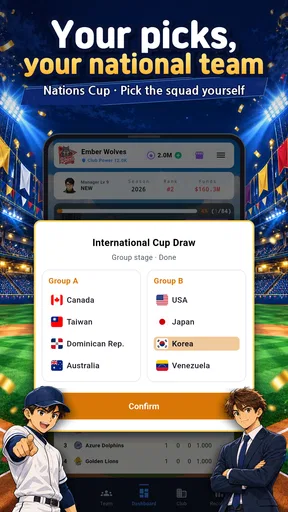
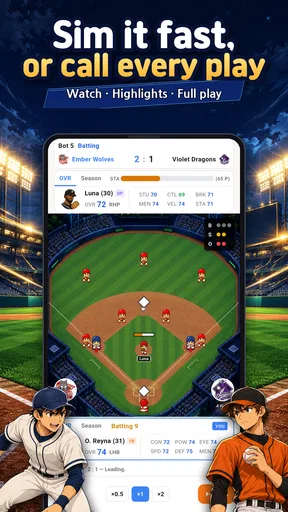
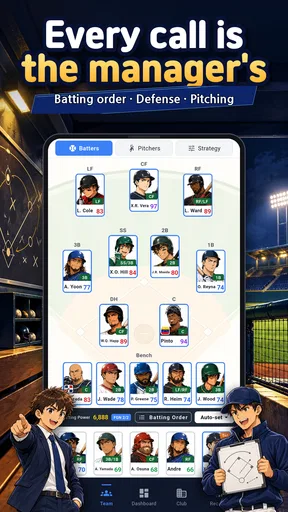
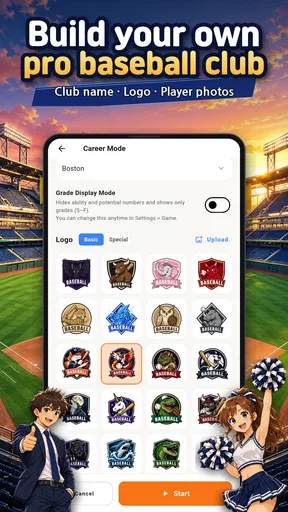

Our Review of Club Story: Baseball Manager
 Analysis by Appyee
I approached Club Story: Baseball Manager as a sports management game rather than a quick arcade baseball title. Its appeal is in making decisions around a club: choosing a direction, handling player development, and trying to turn a modest team into a lasting baseball organization. That sounds simple, but the enjoyment depends on whether you like gradual progress and planning more than instant action.
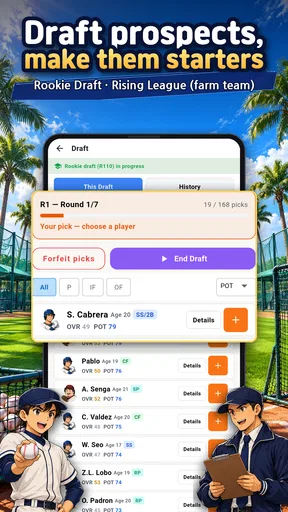
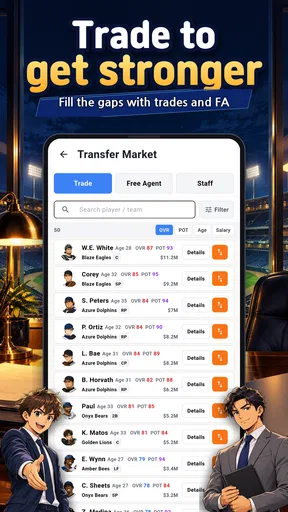
My first impression is that this is best suited to players who enjoy checking a team, making a few meaningful choices, and returning later to see whether those choices worked. It is not the kind of game I would recommend to someone looking for a detailed batting or pitching simulator. The focus is the club itself, and the store summary points clearly toward playing, signing, drafting, and developing players. I found that distinction important before spending time with it, because expectations can make or break a management game.
The game comes from NBstudio and is free to start. It is listed for Everyone, which makes it approachable for a broad audience, while optional in-app purchases range from $0.99 to $35.99 per item. I would treat those purchases as a reason to set a personal spending limit before getting deeply involved, especially if you enjoy progression systems and are tempted to speed things up.
Where the experience can become confusing
The biggest early challenge is understanding what deserves attention first. A baseball manager game can present several tempting directions at once: improving the current roster, looking for new talent, preparing for the next contest, or building toward a stronger long-term team. If you react to every option immediately, it is easy to lose sight of the club’s actual needs.
I recommend beginning with a simple question: what is the weakest part of the team right now? If the roster lacks dependable depth, signing another headline player may not solve the practical problem. If the club has promising players who are not ready to contribute, development may be more useful than constant recruitment. This way of thinking makes the game feel less like tapping through menus and more like managing a project with limited attention.
Another possible sticking point is the difference between short-term success and a healthy long-term roster. A move that helps the next result may not be the best choice for the future. New players can be exciting, but a club built only around immediate upgrades may become difficult to manage when development and squad balance matter more. I found it more satisfying to accept occasional setbacks while building a clearer identity for the team.
Players who expect every decision to have an obvious answer may find that uncertainty frustrating. Management games are often strongest when they make you weigh alternatives, and Club Story works better when you allow yourself to experiment. Before changing several things at once, I would alter one part of the plan and observe what follows. That creates a useful cause-and-effect loop instead of leaving you unsure which decision helped or hurt.
Start with a manageable club plan
A practical opening plan is to divide your attention into three stages. First, understand the current roster and identify the position or area that most limits the team. Second, decide whether the next improvement should come from signing, drafting, or developing someone already associated with the club. Third, keep enough flexibility to respond when the team’s results or player needs change.
This approach is more useful than trying to build a perfect roster immediately. A perfect roster is also a vague goal, while “improve depth” or “develop one promising player” gives you something you can actually evaluate. It also reduces the temptation to spend simply because a new option appears.
One non-obvious benefit of this method is that it makes mistakes easier to read. If you recruit, change the lineup, and redirect development all at once, a poor result tells you very little. If you make one deliberate adjustment, you can learn whether your judgment was sound. That is especially valuable for new players who are still learning how the game presents its baseball decisions.
Setup checks before blaming the game
When a management game feels slow to start or does not seem to respond as expected, I would first check the basics on the device. Club Story: Baseball Manager supports Android 7.0 and later, so the operating system should be compatible before troubleshooting anything more complicated. On an older phone, available storage, background activity, and general system performance can still affect how comfortable the game feels even when the operating system meets the requirement.
I would also close other demanding apps, restart the device, and open the game again before changing settings or reinstalling it. This is ordinary advice, but it matters for games that keep track of ongoing team decisions. A clean restart can separate a temporary device problem from a genuine issue with the application.
Keep the game updated to version 2.1.8 where that version is available for your device. If an update has just been installed, give the app a moment to settle rather than repeatedly opening and closing it. When a problem appears after an update, note exactly what changed: whether the game fails to open, whether a screen stops responding, or whether a particular action does not complete. That description is much more useful than saying only that the game is broken.
Connection quality is another sensible check whenever an action appears not to finish. Switch between a stable Wi-Fi connection and mobile data if both are available, then try again only once the connection is steady. Avoid tapping the same action repeatedly while waiting, because repeated input can make it harder to tell whether the original request is still processing.
There is also a spending check that I consider part of setup. Since the game is free but includes optional purchases, I would review the purchase controls on the device before handing it to a child or letting someone else use the account. The Everyone rating describes the content audience, but it does not remove the need for sensible purchase supervision.
Use a repeatable testing routine
When a feature seems unreliable, test it in a consistent order. Return to the main screen, confirm that the previous action has finished, and try the same step once more without changing several unrelated settings. If the issue disappears, it may have been temporary. If it repeats, record the exact sequence that led to it.
This routine also helps with progression decisions. If a player does not appear to improve, do not immediately assume the development choice failed. Check whether you selected the intended player, whether the action was accepted, and whether enough time or progression has passed for a visible change. The important point is to distinguish an unclear result from a technical failure.
I would take screenshots for personal reference when a roster decision or purchase prompt looks confusing, but I would avoid sharing private account information. A clear description of the screen and the action that preceded it is enough for ordinary troubleshooting. There is no value in exposing personal details simply to explain a game issue.
Recovering a workflow after a poor decision
One of the most useful ways to play is to treat the club as a sequence of experiments. If a signing does not fit the team, do not respond by replacing half the roster immediately. Look at what the move was supposed to fix, then decide whether the real problem was the player, the surrounding squad, or the original diagnosis.
For example, a team may appear to need a stronger individual player when the more practical weakness is a lack of depth. In that situation, one impressive addition may not change the club’s results as much as a broader but less glamorous improvement. This is the kind of trade-off that gives the management layer its value, and it is a good reason not to judge a decision after a single disappointing outcome.
Drafting and development should also be considered together rather than as isolated buttons. A new prospect may be attractive because of future potential, but the club still needs a sensible path for players already on the roster. If development is ignored whenever a new option appears, the team can become a collection of short-term ideas instead of a coherent project.
My preferred recovery method after a bad run is to pause recruitment, review the roster from the weakest area upward, and choose one correction. I would then play or manage through the next meaningful stretch before changing anything else. This prevents emotional decisions and makes it easier to see whether the correction actually helped.
Protect your progress and your patience
It is tempting to spend when progress feels slower than expected. The free entry point makes that decision easy to postpone, but the available purchases mean it is worth deciding in advance what kind of player you want to be. If you enjoy solving problems with the resources already available, keep the focus on planning. If you prefer a faster route through progression, understand that spending can change the rhythm of the experience rather than automatically making the decisions more interesting.
I would not make a purchase simply because the club has hit a rough patch. A losing stretch may reflect a poor roster plan, an unrealistic expectation, or a need for better development rather than a requirement to buy something. Waiting until you can explain exactly what the purchase would improve is a useful safeguard.
Another practical habit is to play in short, deliberate sessions. Check the roster, make one or two decisions, and stop when you no longer feel able to judge the next move clearly. This works especially well for a management game because tired or hurried choices tend to become reactive. A short session can be more productive than repeatedly opening the game without a plan.
When the app is not the cause
Not every frustrating result is a technical problem. Baseball management involves uncertainty, and a decision can be reasonable without producing the result you wanted. If the game opens normally, accepts your actions, and shows the expected progression, an unsuccessful outcome is more likely part of the challenge than a malfunction.
Device performance can also be mistaken for an app issue. An older phone that is nearly full, running many background processes, or operating under heavy battery restrictions may make any game feel less responsive. Freeing storage, closing background apps, and restarting the device are sensible steps before deciding that Club Story itself is responsible.
Connection problems are another common source of confusion. If one action takes longer while other parts of the phone are also struggling to connect, test the network separately. Repeating the same tap will not repair an unstable connection, and it can create more uncertainty about what the game has already received.
There is a difference between not liking the game’s pace and the game failing. Some players want immediate control over every pitch, while this title is aimed more at building and guiding a professional baseball club. If you are waiting for a hands-on baseball simulator, no amount of troubleshooting will turn a management-focused experience into that different genre.
The same distinction applies to depth. A player who wants a highly detailed simulation with extensive statistical control may prefer a more specialized alternative. Club Story is a better fit for someone who wants the accessible fantasy of shaping a baseball organization without making every moment of play a technical exercise.
A realistic everyday use case
Imagine having ten minutes during a commute or a break. I would open the game, review which part of the roster is currently holding the club back, check whether an existing player deserves development attention, and make one measured adjustment. I would avoid making a purchase or rebuilding the team in that short window, because rushed decisions are harder to evaluate later.
At home, with more time available, I would compare the result of that adjustment with the original goal. Did the team gain depth, or did the change simply add another player without solving the weakness? Did a development choice support the club’s direction? These questions turn a brief mobile session into a continuing management story rather than a series of disconnected taps.
This workflow is also useful for families. The Everyone rating makes the game broadly approachable, but younger players may still need guidance around optional purchases and around the difference between patience and spending. Helping a child set a team goal can make the game more educational and reduce the pressure to buy a quick solution.
Who should play it and who should skip it
I would recommend Club Story to players who enjoy roster building, gradual improvement, and the satisfaction of seeing a club develop according to their choices. It is particularly suitable if you like sports games but do not need to control every on-field action. The idea of turning a team into a long-term project is the strongest reason to try it.
I would be more cautious if you dislike waiting for development, comparing alternatives, or recovering from decisions that do not work immediately. The game’s central appeal depends on accepting that a club is not fixed in one session. Players who want fast, highly physical action should look toward an arcade baseball game instead.
It may also be the wrong choice for someone seeking a deep professional simulation with every possible management variable exposed. A more specialized baseball manager may suit that audience better. Club Story makes more sense as an approachable entry into the club-building side of sports games, where the decisions are understandable but still offer room for judgment.
The current audience response gives it a reasonable starting signal: it holds a 4.0 average from around 418 ratings, with 10K+ installs. I see that as evidence of an active, interested player base rather than a guarantee that every baseball fan will enjoy it. The number of ratings is useful context, but your preference for management over direct gameplay matters much more.
My practical verdict after playing
Club Story: Baseball Manager works best when I approach it as a patient team-building game. Its strongest idea is not simply collecting players; it is deciding what kind of club I want to create and making choices that support that direction. The experience becomes clearer when I focus on one weakness at a time, test changes carefully, and resist treating every setback as a reason to spend.
The main friction comes from the same place as the appeal: management requires interpretation. New players may need time to understand which action solves which problem, and impatient players may feel that progress is too indirect. Optional purchases add another decision layer, so I would set spending boundaries before getting invested in the club.
Released on June 29, 2026, and currently listed at version 2.1.8, the game is a free sports option for Android users on version 7.0 or later. I would give it a try if you want a compact baseball dynasty project and enjoy making measured roster decisions. I would skip it if your ideal baseball game is all about direct control, instant matches, or exhaustive simulation detail.
My final advice is simple: begin without spending, define a clear team goal, and give each adjustment enough time to judge properly. If that slower, thoughtful rhythm feels rewarding, Club Story: Baseball Manager can become an enjoyable routine. If it feels like too much waiting and not enough action, the problem is probably not your device or your setup; it is that this particular style of baseball game is not aimed at you.
Verdict
Strengths of Club Story: Baseball Manager
- Simple controls make team management easy to learn.
- Season progression gives each match a clear purpose.
- Roster decisions add depth beyond simply playing games.
- Short sessions work well for quick mobile play.
- Baseball-focused presentation feels appealing to sports fans.
Limitations of Club Story: Baseball Manager
- Progress can feel repetitive after several seasons.
- Some upgrades may require considerable time to unlock.
- Limited strategic variety may disappoint experienced managers.
- Match outcomes can sometimes feel difficult to influence.
- Performance may vary on older phones or tablets.
Similar Picks in This Category
View All
8 Ball Pool
Miniclip.com4.8

Pooking - Billiards City
AIM TOP GAME TECHNOLOGY LIMITED - pool4.6

Carrom Pool: Disc Game
Miniclip.com4.4

EA SPORTS FC Soccer Mobile 26
ELECTRONIC ARTS4.6

World Soccer League
mobirix4.3

Soccer Cup 2026: Football Game
INLOGIC SPORTS - football tennis golf soccer4.3
Frequently Asked Questions
What is Club Story: Baseball Manager?
Club Story: Baseball Manager is a baseball management game focused on building and developing your own team rather than controlling every pitch manually. You can recruit players, improve their abilities, arrange lineups, manage club resources, and compete through a progression system. It is designed for players who enjoy planning, statistics, roster decisions, and long-term team development more than traditional arcade-style baseball action.
Can I play Club Story: Baseball Manager offline?
The game may allow some management activities without a constant connection, but online access is generally important for features such as account synchronization, events, rankings, updates, advertisements, and purchases. Availability can also depend on the current version and device. Before downloading, players should expect that an internet connection may be required for the complete experience, especially when entering competitive or live-service sections.
Is Club Story: Baseball Manager free to download and play?
Club Story: Baseball Manager is typically offered as a free download, but the game may include optional in-app purchases. These can be used for resources, progression items, convenience features, or other content depending on the version available in your region. You can usually begin playing without paying, although advancing faster or competing more efficiently may encourage spending, so checking the store listing and purchase settings is recommended.
Does the game require real baseball knowledge or experience?
You do not need advanced baseball knowledge to start playing Club Story: Baseball Manager. The game introduces its main systems through menus, objectives, and guided progression, making it accessible to newcomers. However, understanding positions, player roles, statistics, form, and tactical choices can improve your results over time. Experienced baseball fans may enjoy examining the deeper management decisions and optimizing their roster more carefully.
What devices are compatible with Club Story: Baseball Manager?
Compatibility depends on the Android or iOS version currently distributed by the developer, as well as your device's operating system, memory, and available storage. Before installing, review the official Google Play or App Store listing for the latest requirements. Because management games can receive frequent updates, an older phone or tablet might experience slower loading, reduced performance, or limited access to newer features.
Play our best games!


